
Overview
The 14IP Presence Phone App allows users to configure and toggle their FreePBX® Presence settings from their Deskphone.
Setting Up Presence from 14IP Phone App
-
Press the Presence button on the Phones Home Screen.
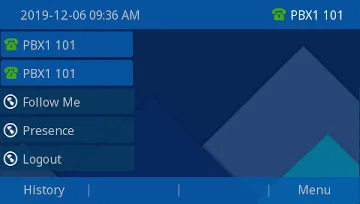
-
Press the Settings Button.
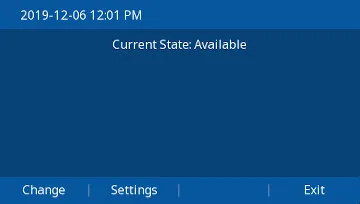
-
Use the Arrow Buttons to select the Status you want to Edit.
Note: These Presence States are created from the Admin Web GUI, Under Admin –> Presence State
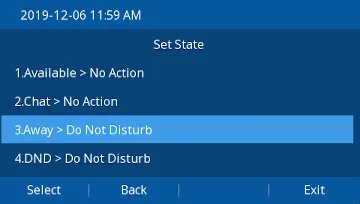
-
Arrow Down to the State you want applied to that Status for your Extension.
Example: When Away you may want to enable FollowMe so calls will follow to their Cell Phone, and for Extended Away and DND you want to Enable Do Not Disturb so those calls go straight to voicemail

-
Press Select to change that Status’ State, Or Back or Exit to back out without making changes.
Toggle Presence Status
-
Press the Presence button on the Phones Home Screen.
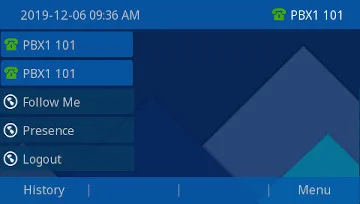
-
Press the Change Button.
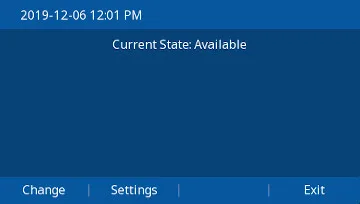
-
Arrow Down to the Status you want to set, and Press Select
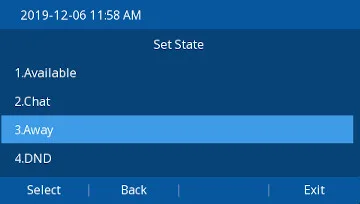
-
You will see a screen confirming your Setting and showing what Action is tied to that Status
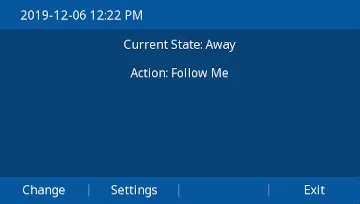
-
Press Exit until you are back to the Home Screen





'/%3E%3C/svg%3E)

'/%3E%3C/svg%3E)
'/%3E%3Cpath%20d='m720%20345%2015-45%2015%2045-39-28h48'/%3E%3Cpath%20id='s'%20d='m675%2057%208%2026%2026-10-15%2023%2023%2014-27%202%204%2027-19-20-19%2020%204-27-27-2%2023-14-15-23%2026%2010'/%3E%3Cuse%20href='%23s'%20x='133'%20y='123'/%3E%3Cuse%20href='%23s'%20x='-150'%20y='163'/%3E%3Cuse%20href='%23s'%20y='400'/%3E%3Cuse%20href='%23s'%20transform='matrix(2.1%200%200%202.1%20-1192%20240)'/%3E%3C/svg%3E)

'/%3E%3C/g%3E%3Cuse%20x='525'%20href='%23b'/%3E%3C/g%3E%3Cuse%20y='375'%20href='%23c'/%3E%3C/svg%3E)
